nuffnang ads

Showing posts with label sony ericsson x8. Show all posts

Tuesday, October 2, 2012

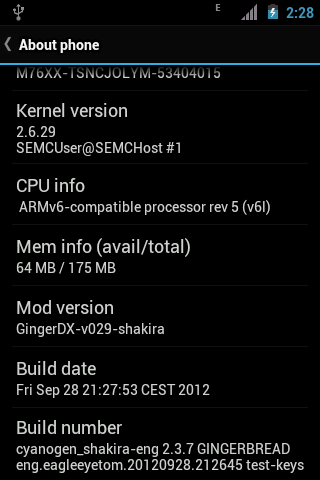
GingerDX update v029

it has been a month after the release. better android management on custom kernel. TeamFun is now incharge of Doixanh great rom for X8 consist of eagleeyetom, djnilse and AChep.


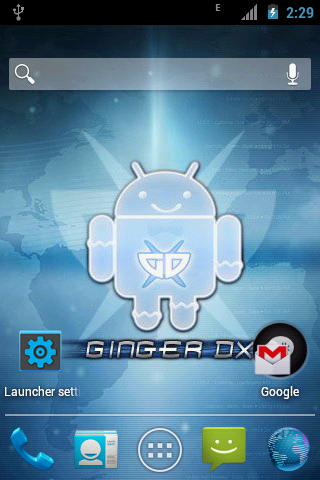
it has an ICSes themes. but not ICS. well i believe GB is the best rom for X8 anyway. moving to ICS would decrease the Ram availability. but this theme look promising. nice graphic.
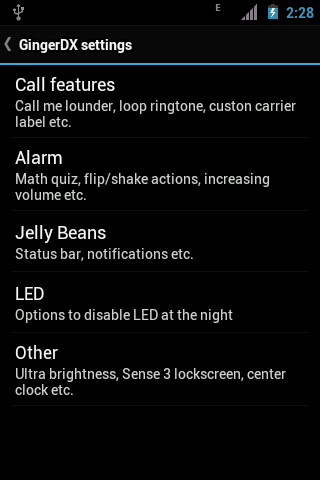


Features

Clean and latest CM7 nightlies. Latest Gingerbread 2.3.7
Fully working Camera
Minimal number of apps are installed.
Lightweight.
Stock Kernel Modules: ax8mt (fixed), ext3/4, x8gesture, x8mddi, x8uv, x8smartass, x8netfilter
The usual things as with other ROMs: WiFi, BlueTooth, USB, Sensors, 3D, Video, FM Radio, Camera, Rooted, JIT,
ZIP-aligned, App2SD, ...
As smooth as doixanh's CM6 Froyo ROMs in 2D (menu scrolling/flinging...)
WEP AdHoc support
ClockworkMod recovery 5.0.2.8
CallMeLouder: Louder ringer when the phone is inside a bag or pocket.
Improved Flipping down mutes ringer
Flipping down/shaking snoozes alarm
Disable LED notification in night
Back button ends call
Menu button answers call
Built-in Transparent Status Bar support
Hide avatar in SMS
Quick Copy / Quick Paste
Custom carrier text
Built-in loop ringtone support without OGG editing
Optimized ("smoothened") scrolling/flinging
Random Lockscreen
Sense Lockscreen
Sleep button on Power Control widget
Center clock on status bar
Configuration section (with localization for many languages)
WiFi tethering
EduRoam WiFi compatible!
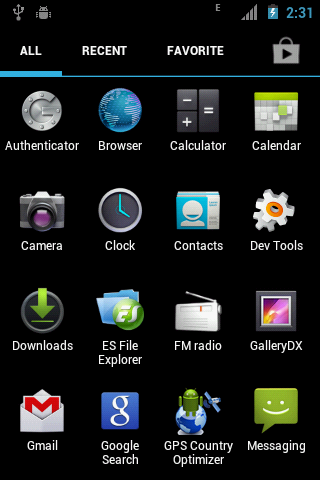
GalleryDX (replacement for Stock Gallery, based on QuickPic)
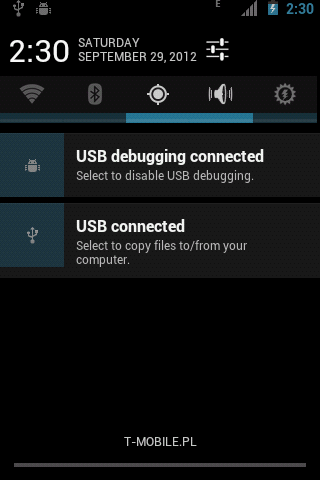
Jellybean-style status bar and notifications
ICSified by integrating AChep's ICS Layouts natively into the ROM (a/k/a "AChepified")
This is here to stay, we won't revert to the standard Gingerbread style
AChep's ICSandwich Theme included and set as default
ICS Wallpapers added into CMWallpapers
ICSified Settings by djnilse
GDX Update Notification by djnilse
GPS Country Optimizer by djnilse
Pick-up-to-call by djnilse
Pick-Up-To-Call in phone dialer and MMS
• Enable it in Settings -> CyanogenMod settings -> GingerDX settings
• Type the number in the dialer
• Move it to your ear (or pull your finger on the proximity sensor and hold the phone vertically) and the number will be called
• Same in Mms, there it just calls the number of the chat/sms you're reading

For more info, download link and supports. come join the community
HERE

Thursday, September 20, 2012

Make Money by playing games and installing application with your Android Phones


Rather than wasting time playing game and headache when the bills come at the end of the month. why not make some MONEY along with it. If it cant help you pay the bill at least it can help you buy some apps from the market right? 

Here's an application for you to try and see if it can help you make some money online. 


GET CASH -- in PayPal or Amazon Gift Cards for doing simple tasks on your Android Phone or Android Tablet in your spare minutes!! You can earn money by downloading apps, registering in cool websites, and even by playing games! Start earning gift certificates in what would be lost time. You can do it easily at your job, in that boring class, or any place you choose…any time. The awesome part is that when you get friends to install the Free Money Factory app, YOU get paid. When they earn points, the Free Money Factory gives free extra points to YOU, and you get paid even more! And what about when “friends-of-friends” continue the money chain? That’s right -- you get paid EVEN MORE! And this amazing money chain can run for 10 generations! (Think of it: “friends-of-friends-of-friends-of-friends-of-friends….”!) 
Start your own Free Money Factory now! 
The Free Money Factory app is not connected with Amazon or PayPal. This app makes use of their services.


To good to be true?

Well i'm one of those people who was really doubting it. but u don loose anything anyway.

to download the app yourself is simple. there's two method installing this app. you wont find it in the Playstore so you have to download it manually.

before you start to download and install the app make sure to take the following easy steps so your phone will allow installations from outside the Android Market:
  • Go to "Settings"
  • Go to "Security" or"Applications" (depending on your Android version)
  • Check the top box -- "Unknown sources
something like the following...


CLICK ON THE LINK BELOW FOR DOWNLOAD.


OR


If you get a notification asking for a INVITATION CODE just type this following number

225769

CHECKOUT THE MAIN WEBSITE

Sunday, July 29, 2012

How To: Getting Instagram to work on Xperia X8


So for this post, i'll gonna show you how to get Instagram to work on our beloved X8. Well i have to point out that my X8 run GingerDX rom and i cant assure you that it will work on native 2.1 rom or any other rom.

If you open up The Google Playstore and type "Instagram", you get this warning sign on top saying "Your device isn't compatible with this version". 
 
 sucks!! that my first comment when i open it. but nothing to be worried about. if u insist on having this apps on your X8. this is how to get it work. 

1stly is to get the "market" that lets you download and install. open up the browser and search for an apps called applanet  <-- click and u get a new tab to view the website.

dont forget to enable "usb debugging" and " installed from unknown source" in the settings. 

after finish installing the apps. open it up and search for instagram


now you have the instagram fully working. 
lets celebrate by looking for my profile and press follow as a sign of appreciation. 

warning!!!
* the applanet application data depend on the server speed so sometime you wont find what youre looking for. 
** installing an app from an unknown source can be deadly sometime. so please be extreme carefull when downloading thing from the applanet cos some of them are MALWARE. so dont say i dont WARN you. 
*** i dont take any responsibility if anything whatsoever happend to your phone. do this at your own risk. 
**** THANKs ***


Wednesday, February 15, 2012

Bye to Sony Ericsson


Sony Completes Full Acquisition of Sony Ericsson
Sony to Rename the Company Sony Mobile Communications and Accelerate Business Integration

February 16, 2012, Tokyo, Japan - Sony Corporation (“Sony”) today announced that the transaction to acquire Telefonaktiebolaget LM Ericsson’s (“Ericsson”) 50% stake in Sony Ericsson Mobile Communications AB (“Sony Ericsson”) has been completed as of February 15, 2012 (Central European time). This marks the completion of the transaction jointly announced by Sony and Ericsson on October 27, 2011, and makes Sony Ericsson a wholly-owned subsidiary of Sony.

Sony will rename Sony Ericsson “Sony Mobile Communications”, and further integrate the mobile phone business as a vital element of its electronics business, with the aim of accelerating convergence between Sony’s lineup of network enabled consumer electronics products, including smart phones, tablets, TVs and PCs.

Company Overview

New company name:
Sony Mobile Communications AB
Date of name change:
February 2012 (planned)
Representative:
Bert Nordberg, President and CEO
Corporate Headquarters:
London, UK
R&D sites:
Beijing, Lund, Silicon Valley and Tokyo
Headcount:
Approximately 8,000 (as of February 1, 2012)
Principal business:
Design, development, manufacture and sale of mobile phone products
Stated capital:
EUR 100 million


Source : http://www.sony.net/SonyInfo/News/Press/201202/12-025E/index.html

so now it has complete control over the mobile world. hopefully

Thursday, December 8, 2011

window phone 7 HTML5 demo for android


his is an online DEMO of the WP7 OS. that if you wish to migrate to WP7 phones. you can access the DEMO using the native browser. go to http://aka.ms/wpdemo and feel the experience yourself.

when you log into the website. just follow the instruction as you can only select the highlighted with blue dots and swipe the tiles. enjoy.

Wednesday, November 30, 2011

Regina Launcher 3D


Regina 3D Launcher is a 'Home Replacement Application' which uses pure 3D graphics showing various dynamic 3D effects for your pleasure.

Regina Launcher 3D by http://nemustech.com/homepage/. visit the developers site for more info.

download link to android market. https://market.android.com/details?id=com.nemustech.regina&hl=en

dont forget to like ma video too. thanks.

Wednesday, September 14, 2011

MP3 MUSIC DOWNLOAD


MP3 MUSIC DOWNLOAD for android

MP3 music Download by Free Music Inc. are the best software i had ever use for downloading MP3 on my android device. The download speed is kinda fast (depend on your network speed, EDGE is acceptable 3G and WIFI are super fast!). The UI is simple.  You doesn’t have to be an android junkie to use it. Its doesn’t take too long for you to start downloading the MP3.

The latest version v2.4 offers numerous free HD song available. added some lyrics and album cover and some bugs fix.

You can find the app on the android market via your android phone or the pc.

Here’s some screenshot of the app.


you can play straight away the song before downloading, and it has it own player just to make sure u've downloaded the right song.

when running out of idea, picking up from a list is easy.


Tuesday, July 5, 2011

latest news for xperia x8

Sony Ericsson has confirmed once again that there will be no firmware update beyond Android 2.1 (Éclair) for the X10 mini family and the X8. Two reasons have been cited for the decision. The first relates to hardware and more specifically the lower RAM available compared to the X10. The company feels that they couldn’t guarantee “a good user experience by upgrading beyond Android 2.1.” 
well im running froyo right now. and im pretty happy with it. what do you think?
The second reason is that the X10 Gingerbread update was only made possible given that it had a code base that could be reused. The different UI for the X10 mini’s meant that they couldn’t tap into this. Our view is that we wonder why they couldn’t utilise some of the work on the upcoming Xperia mini and Xperia mini pro. Maybe once we see those phones launched, we will also see an update for the older handsets. We can only hope.
taken from www.xperiax10.net

Tuesday, June 7, 2011

Friendcaster for Facebook


FriendCaster for Facebook - Does what the official Facebook application should!
FriendCaster for Facebook (formerly Flow) gives you the best Facebook experience on Android devices!
Advantages of FriendCaster over the standard Facebook for Android app:
General
★ More Secure with Enforced SSL Encryption
★ New ActionBar UI
★ Pull To Refresh (like how the iPhone Facebook does it)
Notifications
★ Gmail Push Notifications. FriendCaster can check for emails that Facebook sends to you telling you that you’ve got a notification.
★ Notifies on Facebook Messages, Friends’ Birthdays & Notifications
★ Notification Popup (which can show over Lock-screen and has Quick Reply). Similar to SMS Popup, Handcent SMS, etc.
Postings
★ Share Links from the Browser easily without being redirected to Mobile Web
★ Ability to select the privacy setting for each Facebook Status/Post you make
★ Ability to Like comments and see how many likes comments have
★ Re-Share your Facebook Friend’s Posts
Friends
★ Add Facebook Friends as Favorites for easy access
★ Ability to Add/Remove Facebook Friends
Photos
★ Upload multiple photos (with Gallery)
★ View the Photos that your Friend’s are tagged in on Facebook
★ View and Tag Friends in Photos on Facebook
★ Upload Photos to Groups and Pages (that you own) on Facebook
Videos
★ Upload Video to Facebook
★ Upload multiple videos with the Gallery App
Other notable features:
- Excellent Widget
- Checkin & Places
- View your Events and Groups
- View Friends, their profiles, photos and albums
- Upload High Resolution Photos
- RSVP to Events, see who’s attending and where it is
- In-built Inbox Messages view
- Vibrate, LED and Sound options

We're adding new features all of the time, so check back often!
Planned Features Include:
- Tablet layouts
- Chat
- Themes
- Contact Syncing
latest version add:
  1. New! Option to hide posts from apps and games
  2. New! Add To Calendar option on Events Info
  3. Improved NewsFeed/Wall Look
  4. Improved Photo Uploading Quality
  5. Improved Pull To Refresh
  6. Sort Pages in List
  7. Fixed Advert flickering
  8. Fixed FCs
  9. Fixed Login
  10. Fixed Event Times (Timezone issue)
  11. Changed image loading graphic
  12. Fixed (some) Notifications going to Mobile Web
  13. Updated Translations
this video down here is the video for ipad... no offical video yet for the app. 

Monday, June 6, 2011

drag racing for android


The most addictive drag racing game with realistic controls and 40+ cars!
The most addictive drag racing game with realistic controls, updated regularly with new features, adding 100k new players every day!
- Drive 40+ cars from Integra to Evo to Veyron SS
- Buy performance upgrades and tune your car
- Challenge other racers online!

Thursday, April 14, 2011

X8 TWEAK ONE FINGER PINCH2ZOOM


Doixanh from the xda have release a kernel module that enable a dualtouch touchscreen driver for SE X8. Its something like a simulator. This mod is not 2 finger pinch2zoom nor a Dual-Touch, its still a work in progress and he mention that it might behave incorrectly.  But he’s working to make dual touch possible in the future. hopefully, but his effort got my full support and respect.
His idea is to make the android system to detect a second finger event  when touching the screen is brilliant. The second finger is only to trick the screen to detect a second touch even though really u are pressing one at a time.
This is how its work:- quoted from xda thread.
Very Important : How to zoom
Right now it supports only zoom-in, zoom-out, and rotate. I will improve it over time. For who says it's not working, please read this how-to very carefully:
- To activate gesture : Put two fingers near each other, lift one finger up.
- To zoom-in (make things bigger): Activate gesture near the center of the screen. Move your remaining finger away from the gesture position to zoom-in.
- [new in v003] To zoom-in with specified zoom-in position: Do a normal touch to the zoom-in position (your face in an image, for example), then activate the gesture a little bit away from the zoom-in positionshortly after the previous normal touch, then drag to zoom. I know, it's a little bit hard to understand ~.~ I will make a short clip for the tutorial
- To zoom-out (make things smaller): Activate gesture at the corner or the side of the screen. Move your remaining finger toward the screen center to zoom-out.
- To rotate : Activate gesture at the corner or the side of the screen.Move your remaining finger around the screen center to rotate.

Its kinda weird and awkward at first but with a few practising, u’ll get the hang on it. And its fun.
Requirement:
-Rooted
-xrecovery
-the driver
Currently from my testing, gmap doesn’t work. It work but with undesirable way in the browser. But this module thing is a good start.
There’s two way to installed the driver, manually or by xrecovery but  i recommend using xrecovery if you are not a android expert. It is easier and safer.
Instruction for installation with update.zip:
- Download update.zip according to your current ROM
- Reboot and flash with xRecovery
- Report bugs to him.
 
For the list of supported rom and the updated file is here.
BIG THANKS TO HIM AND THE XDA DEV THAT INVOLVE IN THIS PROJECT.
update: I’ll attach some video also.

JIT for x8

BOOSTING x8 with JIT enabler

Taken from the main thread at XDA. Posted by Siso93

FOR LASTEST SE UPDATE 2.1.1 ->
http://forum.xda-developers.com/atta...9&d=1297254645 

FOR FIRST 2.1 SE UPDATE 2.0.1 ->
http://forum.xda-developers.com/atta...9&d=1297130598

It is an update.zip for your xRecovery that will install on your phone Jit.

instructions: (taken from this tread:
http://forum.xda-developers.com/showthread.php?t=902974)

You will need to extract the 2 files from the .rar archive and then rename the one you want to "update.zip" (Without the quotes) and copy to your SD Card. Then reboot yor phone and start xRecovery... choose "Install update.zip".

In the rar file are included the Enabler/Disabler 


Hope you liked it 


Thanks (another time) to shpit 


This script will increase your quadrant/linkpack score

In particular: Quadrant -> Before 416 After 520 (ca)
LinkPack -> Before 4.088 After 7.88

NOTES: The first time you reboot you have to wait around 4-5 minutes on the SonyEricsson (green) logo this is only for the first time, Don't worry 

porting xrecovery to xperia x8

INSTALLING xrecovery on your X8

On my previous post, i stated the method of installing xrecovery is the same method as the on X10, sorry ... its wrong... the only same method is the manual installation. The xrecovery installer.apk does not work with x8 and This method also works with the minis edition.

What you need;
  1. a rooted x8
  2. The 3 mod file xtracted from the xrecovery 0.1 :  xrecovery. Zip, chargemon and busybox.
  3. Root explorer

3)      
Follow the instruction carefully, nothing bad will happen.

1.       Download the required file and out in your SD root folder. Extract it to the 3 file as mention above.
2.       Now, open the Root Explorer and copy those 3 file to Phone/system/bin that is in your phone memory not your SD. Press the R/O @ R/W button on the upper screen before paste.  If not you can’t move the file at all. Exit the root explorer. DONE!
3.      
how to boot to recovery;
4.       Reboot the phone and press the back button repeatedly until u see the xrecovery menus. Use vol-up and vol-down to navigate around menus, Home button to select and BACK/POWER to go back to previous menu.

For the xrecovery file download visit the xda-developers.com x8
I don’t mirror other peoples work. Sorry dudes. 

Now you can make backup, flash custom roms, flash custom tweak to your phone without using the Flash tool.
All the credits goes to a lot of Thanks to zdzihu and all the xda dev.

Tuesday, March 29, 2011

X10 get Gingerbread but what bout x10 mini and x8?

Whilst Xperia X10 owners are rejoicing on the news about Android Gingerbread heading to the headset, unfortunately it is not good news for the smaller Xperia models. Sony Ericsson has confirmed that as they need to “prioritise” their resources and thus there are no current plans for the X10 mini, X10 mini pro and X8 to receive the update. What we do know with SE is that they always seem to change their mind, so if you’re being optimistic maybe we will see it at some point down the road after all.


via Unofficial X10 blog

news on Gingerbread for X10

Official Announcement by S.E.

Monday, March 7, 2011

papertoss for android


here's a video review of Papertoss. its super glamour at the ios platform. and now building up their empire on the android platform.

boost your xperia performance with a custom JIT Compiler

Definition;

In computingjust-in-time compilation (JIT), also known as dynamic translation, is a method to improve the runtime performance of computer programs. Traditionally, computer programs had two modes of runtime operation, either interpreted or static (ahead-of-time) compilation.[citation needed] Interpreted code is translated from a high-level language to a machine code continuously during every execution, whereas statically compiled code is translated into machine code before execution, and only requires this translation once. for a deep info refer here 


Why JIT? 


XPERIA is so slow... that why we should do the tweak... hehe... 


Requirement before doing Jit:


1. a rooted xperia with the latest busybox
2. xrecovery installed
3. all the necessary file.


this jit compiler version only work with xperia x10. 
Download: JIT_Enabler_v2-zdz.zip


the main tread at xda-developers


HOW-TO-INSTALL


Download JIT Enabler v2 to your PC. Do NOT unzip the file
Transfer the file to your Xperia X10 SDcard. Put it on the root and give a easy name to look for.
Re-boot into xRecovery.
From the xRecovery, go to menu select ‘Advanced Options’ and then select ‘Wipe Dalvik Cache’. It will ask you whether you are sure, select ‘Yes – Wipe Dalvik Cache’. this will not reset your phone. dont worry. you can google for the definition if you want to know Dalvik mean.
in xRecovery menu, select ‘Install custom zip’. Select ‘Choose custom zip from sdcard’ to browse where the zip file is located on your memory card and install the file.
after that just go back to the main menu and reboot the phone. after a few boot the the speed of the phone would increase significantly. 

my score with Quadrant Standard with overclock Widget boost. before Jit installed.

after Jit installed.

thanks to the Dev at XDA-Developers for this powerfull tweak. all credits goes to them. 

Sunday, March 6, 2011

installing xrecovery (Xperia X10 only)

so for this post i'll be posting How-to-install xrecovery on your xperia x10

What is xrecovery?

"xRecovery is a custom recovery console that allows you to manage backups and install ROMs, themes and applications from zip files. Other functions include the ability to wipe your phone and manage partitions. "

This is the only xrecovery that would only work with the Xperia x10i. So I don’t recommend using other app that you might find on the app market, unless you have made a study on it.  Remember! I don’t guaranty other app or method will work. You might brick you Xperia.

A special thanks to xda dev member

zoz33 for his apk installer!
Walkmann for X10 HD solution

You can get the latest xRecovery from the Xda forum. Version 0.3 is latest version during this writing that works perfectly on xperia x10 and for xperia x8 get the 0.1 version. Try to visit the xda-developers forum for the latest info on the xrecovery version and method on installing.

Requirement before proceeding,
1. a rooted xperia
2. busybox by stecricson- can be download from the market.
3. of cos the xrecovery.apk from a trusted source.

Features:

·         ADB root shell
·         Reboot
·         Install update.zip from SD Card
·         Factory reset (full wipe)
·         Wipe cache partition
·         Install custom zip
·         Backup and Restore
·         Partition tools
·         Mount/unmount partitions
·         Format partitions
·         Mount as USB Storage
·         Advanced options
·         Wipe Dalvik cache
·         Wipe battery stats
·         Fix permissions for apps (FC fix)

How to install xrecovery,

transfer the apk file to your SD then Open xRecovery installer app with a file manager and tap "Install xRecovery"

look at the picture below, follow the sequence of the picture, the xrecovery installer only help you detect the xrecovery.apk file and installed it.


after installing the xrecovery installer, let the installer look for the xrecovery.apk file that you have put in the sdcard. put it on the root of the SD to make it more easy to find.


make sure you select the "allow" button,


success!!!


Manual Installation:
- Download the apk, rename it to xrecoveryZIP
- Unpack the file, find ./res/raw folder inside. It should contain 3 files (chargemon, busybox, xrecovery.tar)
- copy these 3 files into /system/bin using root explorer (remember to remount /system rw


Notes:
Please bear in mind that it's not the regular android recovery (we cannot replace recovery image without cracked bootloader). Instead, the boot hijacking is used to start recovery mode. You still need basic files on your /system partition to use this. NEVER use the "format /system" option (it's there only to check if anyone reads this long, boring note).

This recovery is NOT tested for compatibility with app2sd! Use at your own risk.

This recovery WILL be used to flash custom roms easily.

DO NOT reinstall busybox. Recovery depends on it's particular busybox version

TESTING!!!
If you are confidence with the installation, its time to do some testing. It may sound easy, but sometime we just make mistake. So testing is required. To boot into the console, restart your phone and press the back button a few times after the white text Sony Ericsson logo appears (its the first logo that appear when you start up the phone). Once it starts (something like the following picture), use the volume-up and volume-down buttons to scroll through the menu. Press the home button to select an option and the back button to go back.

the xrecovery interface should look like this, 


this guide is base on the guide from the xda forum thread. 

DOWNLOAD LINK
xRecovery 0.3-release

xRecovery-charge-offline.zip - flash with xRecovery to get offline charging.